Number ranges
Number ranges are used to configure the automatic assignment of order, customer, invoice and delivery note numbers. You can find the corresponding settings under Settings / System / Order and customer number, after opening the Number ranges page.
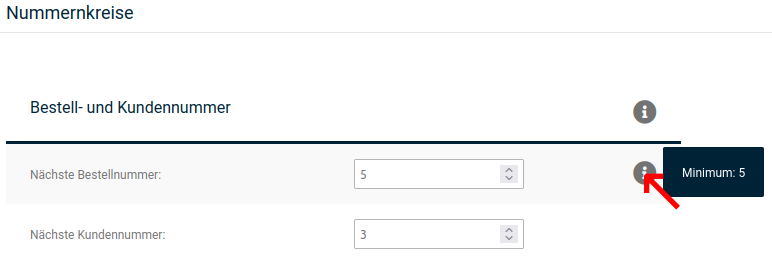
To display the minimum value for a number range, move the mouse pointer in the corresponding row over the info icon that then appears (marked in red in the figure).
Order and customer numbers
The upcoming order and customer numbers to be assigned are displayed in the input fields Next order number and Next customer number respectively. The numbers can also be changed there. Please note that the newly assigned numbers must not be below the displayed minimum. In addition, 1 cannot be assigned as a customer number, as this number is reserved for the main administrator.
Attention
Going below the minimum value causes contradictory entries in the database and thus leads to errors in the shop.
In general, customer numbers can only be lowered if all customer accounts have been deleted beforehand.
Invoice and delivery note number
Here you can adjust the number ranges for invoice and delivery note numbers.
The next invoice and delivery note numbers to be assigned are displayed in the input fields Next invoice number and Next delivery note number respectively. There, the numbers can also be given a new starting value. However, this must not be below the value specified as Minimum.
Attention
Going below the minimum value causes contradictory entries in the database and thus leads to errors in the shop.
In addition, the general structure of the invoice number can be defined in the fields Invoice number format and Delivery note number format. The consecutive number is entered with the placeholder {INVOICE_ID}.
Example
If the following is entered under Invoice number format: R_{INVOICE_ID}_2014, the invoice numbers are assigned according to the following pattern:
R_26_2014, R_27_2014, R_28_2014, etc.
Note
Invoice numbers must always be assigned consecutively. If you have any further questions about this, please contact your legal advisor.
Note that these two numbers are consecutive and are only generated when the invoice or delivery note is created or sent. If you adjust the format afterwards, the new format will also only be applied to newly generated invoices and delivery notes.