Gambio SEO Boost
The shop system can display the URLs of the product pages in a form that is easier for search engines to read. You can configure the readable URLs separately for product, category and content pages under Settings / Search engine optimization / SEO URLs. The function for readable URLs makes use of the functions of mod_rewrite.
Attention
Gambio SEO Boost can only be used on servers that support mod_rewrite. If you activate Gambio SEO Boost on a server without mod_rewrite, your online shop will no longer be accessible!
Activating Gambio SEO Boost
Connect your FTP program to your FTP server. Change to the main directory of your shop and make sure that the file .htaccess is located there. If this is not the case, please upload the file .htaccess from the installation package of your shop software to the main directory of your shop. You will find the file in the installation package under /Shopsystem/Dateien/
Note
If the .htaccess file is not displayed to you, your FTP program may be configured so that invisible files are hidden. You can find out how to deactivate this function from the manufacturer of your FTP program. If the file still cannot be displayed even with the display of invisible files activated, upload the file from the corresponding directory of the installation CD or the installation archive to the main directory of your shop on your FTP server.
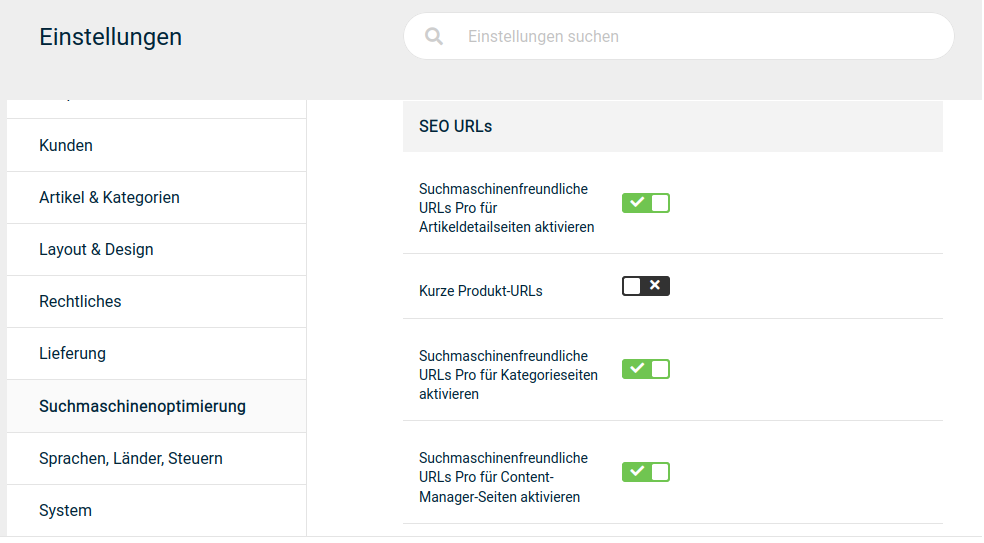
In the administration area of your shop, under Settings / Search engine optimization / SEO URLs, activate the checkboxes for the page types that are to be displayed with readable URLs. If you would like to use the respective country code within the address path of your shop, please also tick the box for Integrate country code in URLs. Via the setting Remove index.php suffix in associated URLs you can specify whether your start page is loaded with or without the index.php part in the address bar. Finally, click on Save.
Empty the caches for the page and module output under Toolbox > Cache.