URL Rewrite
Introduction
Definitions
The following terms are used:
- URL:
- stands for Uniform Resource Locator
- address of a specific page in the shop
- is displayed in the address bar of the browser
- e.g. https://www.mein-super-shop.de/bekleidung/kleider/kragenkleid.html
- Domain:
- name of your shop in the DNS (Domain Name System) of the internet
- part of the shop address, see below
- is displayed in the address bar of the browser
- e.g. www.mein-super-shop.de
- Shop address:
- address through which your shop can be accessed on the internet
- is displayed in the address bar of the browser
- typically contains the domain of your shop, see above
- e.g. https://www.mein-super-shop.de
- URL keywords:
- components of a URL
- product, category and content pages have their own URL keywords for each language used
- URL keywords are unique within a URL, so they cannot be used multiple times for different pages
- in the URL https://www.mein-super-shop.de/bekleidung/kleider/kragenkleid.html, bekleidung and kleider are usually URL keywords from categories and kragenkleid from a product
With URL Rewrite, the URLs for categories, products and content pages can be individually customized by replacing the so-called URL keywords, which appear in the browser's address bar after the shop address, with your own content. Please note that the URL keywords entered for a product or a category usually represent only a part of all URL keywords used:
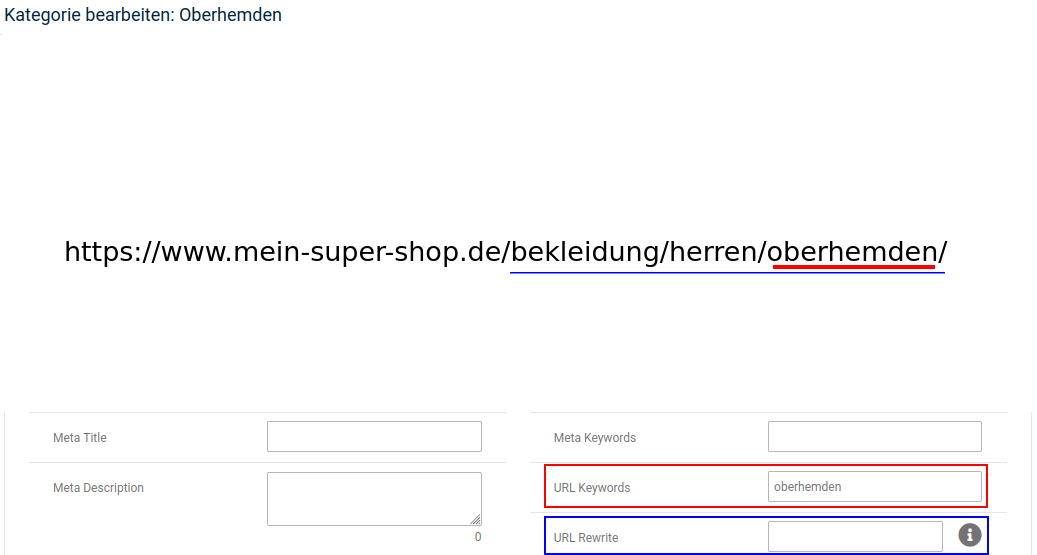
However, URL Rewrite can be used to overwrite all keywords that are contained in the URL of the page in question. The only exception here are content pages, which always use the element /info/ after the shop address.
Attention
The content of the URL keywords field should remain unchanged if possible, and an entry should only be made in the URL Rewrite field.
The URL Rewrite function only works with Gambio SEO Boost activated.
Note
After making changes via URL Rewrite, the caches for
- Product and category assignments (for changes to products or categories)
- Module information
- Page output
should be cleared or regenerated under Toolbox > Cache.
URL Rewrite for categories
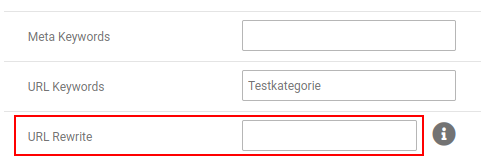
You can change the URL of a category by editing it under Products > Products/Categories. There, in the Category details section, you will find the input field URL Rewrite:
Note
The / between the shop address and the URL keywords does not need to be entered; it is set automatically.
Example
You have a category Bekleidung >> Herren >> Oberhemden >> kurzarm, which can be accessed in the shop via the URL
https://www.mein-super-shop.de/bekleidung/herren/oberhemden/kurzarm
You edit the category kurzarm and enter the following under URL Rewrite:
kurzarmhemden
After the change, the category can be accessed via the URL
https://www.mein-super-shop.de/kurzarmhemden
Note
The change via URL Rewrite within the category does not affect the products or subcategories it contains. A subcategory kurzarm bügelfrei would still be accessed via https://www.mein-super-shop.de/bekleidung/herren/oberhemden/kurzarm/kurzarm-buegelfrei/.
URL Rewrite for products
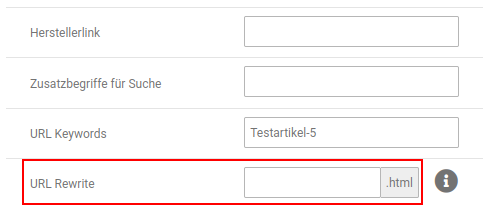
A custom URL can also be defined for individual products. To do this, edit the product under Products > Products/Categories; the URL Rewrite field is located in the Product details section:
Note
The / between the shop address and the URL keywords does not need to be entered; it is set automatically.
Example
You have a product Bekleidung » Herren » Oberhemden » kurzarm » kurzarm Herrenhemd, which is accessed via the URL
https://www.mein-super-shop.de/bekleidung/herren/oberhemden/kurzarm/kurzarm-herrenhemd.html
You enter the following in the URL Rewrite field:
arbeitshemden/kurzarm
After the change, the product is accessed via the URL
https://www.mein-super-shop.de/arbeitshemden/kurzarm.html
Example
You have a product Bekleidung » Herren » Oberhemden » kurzarm » kurzarm Herrenhemd, which is accessed via the URL
https://www.mein-super-shop.de/bekleidung/herren/oberhemden/kurzarm/kurzarm-herrenhemd.html
You enter the following in the URL Rewrite field:
arbeitshemd
After the change, the product is accessed via the URL
https://www.mein-super-shop.de/arbeitshemd.html
Note
Accessing products via shortened links (without URL keywords from the categories) is also possible via the setting Short product URLs under Settings / Search engine optimization / SEO URLs. However, this setting affects all products globally.
The URL Rewrite function overrides the Short product URLs function for the respective product. So it is possible, for example, to specify a category path for individual products, while the short URLs are used for all other products.
URL Rewrite for content pages
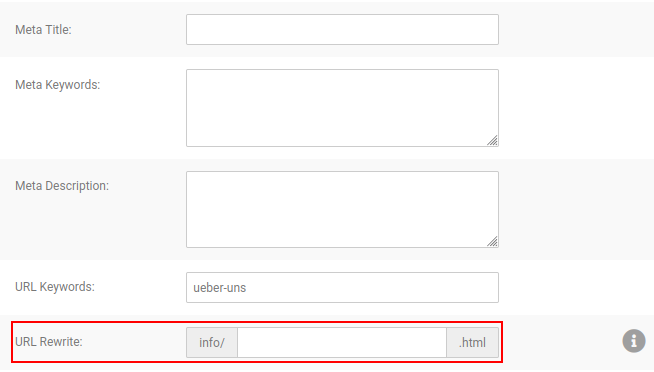
It is also possible to customize the URL of standalone content pages. To do this, go to Content > Content Manager > Pages in the Gambio Admin and edit the desired content.
Note
The / between the shop address and the URL keywords does not need to be entered; it is set automatically. For content pages, the element /info/ is also always added to the URL.
Example
You link from the content Über uns (https://www.mein-super-shop.de/info/ueber-uns.html) to further subpages, e.g. a page Unsere Firma. This is accessed via the URL
https://www.mein-super-shop.de/info/unsere-firma.html
However, you also want to present the content page as a subpage in the URL. You therefore edit the content Unsere Firma and enter the following under URL keywords:
ueber-uns/unsere-firma
After the change, the page is accessed via the URL
https://www.mein-super-shop.de/info/ueber-uns/unsere-firma.html