Reversing an order
Note
The included options for order processing are only rudimentary and are not designed for advanced functions such as partial cancellations and credit notes. If you cannot do without these functionalities, connect your online shop to an ERP or financial accounting system that supports this.
Canceling an order
You can cancel orders in the Gambio Admin of your shop under Orders > Orders. The order status of a canceled order can no longer be changed afterward.
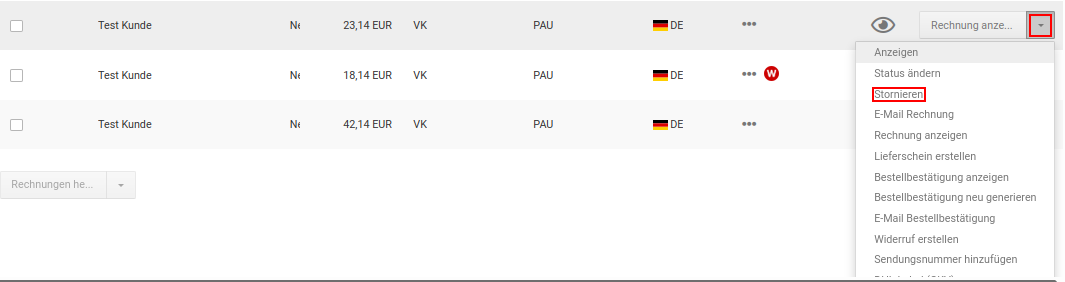
-
Select the order to be canceled from the order overview
The currently selected order has a gray background
-
In the dropdown button, click Cancel
-
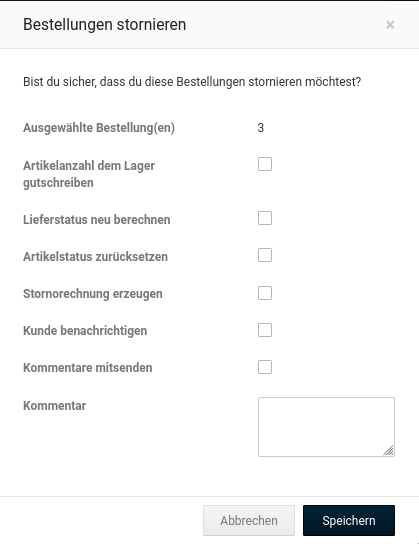
Fill out the Cancel form
A description of the fields in the Cancel form can be found in the table Overview of the Cancel form
-
Click Send
The order status of your order changes to Canceled
Attention
If an invoice has already been created for an order that is to be canceled, a cancellation invoice should be generated for it (see Generating a cancellation invoice).
| Field name | Description |
|---|---|
| Credit product quantity to stock | if enabled, the product quantity is credited to the stock |
| Recalculate delivery status | if enabled, the delivery status for the products of the order is recalculated (only if you use automatic delivery statuses) |
| Reset product status | if the product was set to inactive during the order, this is undone |
| Generate cancellation invoice | if an invoice has already been generated for the order, a corresponding cancellation invoice is created |
| Notify customer | if enabled, the customer is notified about the cancellation |
| Include comments | if enabled, a personal comment is included with the notification |
| Subject | subject of the notification |
| recipient of the notification | |
| Comments | personal comment for the notification |
Creating a credit note
A direct credit note cannot be created without aids such as a connected ERP system. For full cancellations, you can send your customer a gift voucher by email under Gift vouchers > Gift voucher email.
Note
The gift voucher system under Modules > Module Center must be installed and activated so that your customers can redeem gift voucher codes in the shop.