Administrator accounts
When your shop system is installed, a main administrator account is created that has full access rights and cannot be deleted. In the Gambio Admin of your shop under Customers > Customers you can create additional administrator accounts whose access rights you can define yourself.
Creating an administrator account
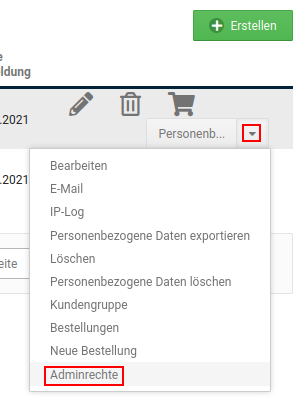
-
Select the customer account to be given administrator rights from the customer list, or create a new customer account as described in the chapter Creating a customer account manually and select the newly created customer account
The currently selected customer account is highlighted in grey
-
Click on Customer group
- Select the customer group Admin from the list
- Click on Update to add the customer account to the Admin customer group
- Click on Admin rights; the Role assignment page opens
- If the required access role for the administrator account is not yet displayed, create it via the Manage access roles area (see chapter Roles and permissions)
- Set the checkmark for the desired access role to assign it to the administrator account
Roles and permissions
Roles and permissions are used to control the access rights for administrators. The individual rights can be configured individually for each role. The role, in turn, can be assigned to the respective administrator accounts.
Managing admins
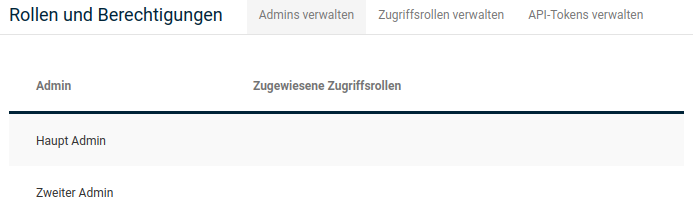
In the Manage admins area, all accounts of the Admin group are displayed. When you move the mouse pointer into the row of an administrator, a pencil icon is displayed. This can be used to assign a role to the admin.
Note
If no pencil icon is displayed for an admin account, it is the main administrator. By definition, this account has all rights.
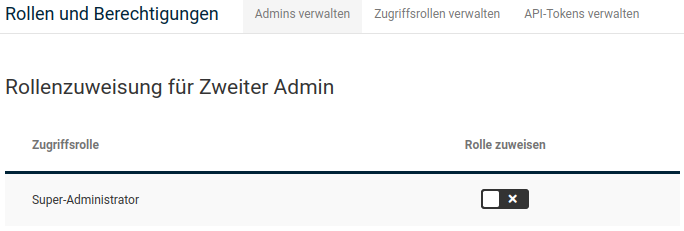
Clicking on the pencil icon opens the role assignment for the respective administrator. The individual access roles are displayed. If a checkmark is set in the Assign role column, the respective role is assigned to the administrator account.
Note
By default, only the Super administrator role is created. Additional roles can be created via the Manage access roles tab.
Managing access roles
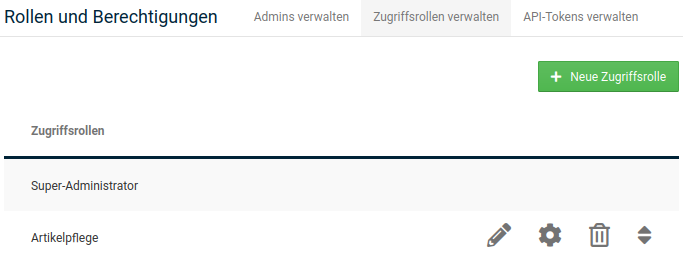
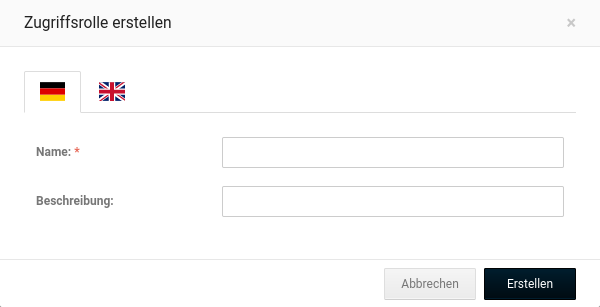
In the Manage access roles tab, all roles are listed. In addition, further roles can be added via the New access role button. When you move the mouse pointer into the row of an access role, the available Actions for this role are displayed. From left to right, these are: Edit, Configure, Delete, Move.
Attention
The Super administrator role should neither be deleted nor changed.
Actions
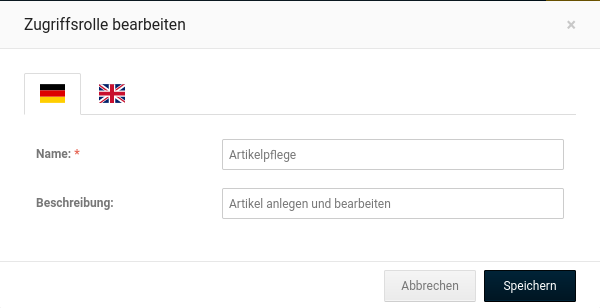
- Edit: define the name and description of the role
- Configure: define the access rights of the role, see Access rights
- Delete
- Move: changes the order of the displayed access roles; click and hold the left mouse button and drag the entry to the desired position
Access rights
Set or remove the Allow access checkmark behind an access right to grant or revoke the right, respectively. Move the mouse pointer over the info icon to display the description of the respective access right.
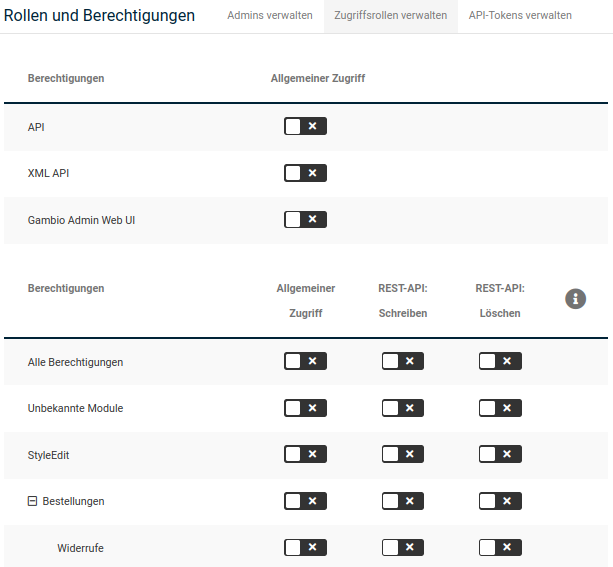
| Field name | Description |
|---|---|
| All permissions | This permission stands in for all permissions |
| API | Allows the general use of the API. This is required, for example, for the use of some ERP systems |
| Gambio Admin Web UI | Allows the general use of the Gambio Admin web interface and access to the Gambio News |
| Orders | Allows the management of orders |
| Withdrawals | Allows access to the withdrawals |
| Invoices | Allows access to the invoices |
| Customers | Allows the management of customers |
| Customer groups | Allows the management of customer groups |
| E-mails | Allows the management of e-mails |
| Roles and permissions | Allows the management of access rights |
| Allows the use of the Google services | |
| Products | Allows the management of products, categories, special offers, properties, attributes and product filters |
| QuickEdit | Allows the use of QuickEdit |
| Manufacturers | Allows access to the manufacturers |
| Packaging units | Allows access to the packaging units |
| Quantity units | Allows access to the quantity units |
| GX-Customizer | Allows access to the GX-Customizer |
| Cross-marketing groups | Allows access to the cross-marketing groups |
| Customer reviews | Allows access to the customer reviews |
| Content | Allows the general use of content options |
| Edit theme | Allows the management of the themes and logos |
| Logo Manager | Allows the use of the Logo Manager |
| Sliders | Allows the management of sliders |
| Content Manager | Allows the management of the shop content with the Content Manager |
| Shop offline | Allows the management of the "Shop offline" settings |
| Banner Manager | Allows the use of the Banner Manager |
| Image Processing | Allows the use of the Image Processing |
| Toolbox | Allows the general use of the Toolbox |
| Cache | Allows the management of the caching system |
| Timer | Allows the management of the timers |
| OpenSearch | Allows the management of OpenSearch plugins |
| Edit texts | Allows the management of the shop texts |
| Newsletter | Allows the management of the newsletters |
| Database backup | Allows the use of the database backup |
| Back up files | Allows access to the backup files |
| Logs | Allows the management of the server logs |
| Server info | Allows viewing the server information |
| SQL | Allows the use of phpMiniAdmin |
| File Manager | Allows the use of the FileManager |
| Modules | Allows the general use of modules from the Module Center |
| Module Center | Allows the management of modules via the Module Center |
| Statistics | Allows viewing the statistics |
| Import / Export | Allows the use of the import and export |
| Product data | Allows the export of product data |
| Gift vouchers | Allows the management of gift vouchers |
| Shop Settings | Allows general access to the Shop Settings |
| General settings | Allows the management of the general settings of the shop |
| Legal | Allows the management of the legal shop settings |
| Delivery statuses | Allows the management of the delivery statuses of the shop |
| Parcel services | Allows the management of the parcel services of the shop |
| Number ranges | Allows the management of the start IDs of the shop |
| SEO | Allows the management of the SEO settings of the shop |
| Zones & taxes | Allows the management of zones and taxes |
| Security | Allows the management of the security settings of the shop |
| Hub | Allows the management of the Gambio Hub |
| Unknown modules | This permission covers all unknown modules. It is recommended that this permission is always allowed |