Static pages
Static pages refers to parts of the shop that are filled with predefined content and therefore cannot be freely configured. Under Settings / Search engine optimisation / Static pages, after opening the page, you can define whether these pages should be included in the sitemap or the robots file, respectively. In order, these are:
| Name | Page in the shop | Sitemap (default) | Robots-Disallow (default) |
|---|---|---|---|
| specials.php | Overview page of the special offers |  |
|
| products_new.php | Overview page of the new products | |
|
| login.php | the 'Sign in' page via which you can either log in or create a new account | |
 |
| password_double_opt.php | Confirmation page when requesting a new password | |
|
| wish_list.php | Wish list | |
|
| shopping_cart.php | Shopping cart | |
|
| advanced_search_result.php | Search results page of the advanced search | |
|
| advanced_search.php | Advanced search | |
|
| newsletter.php | Newsletter subscription | |
|
| index.php | Start page (direct call of the associated PHP file) | |
|
Including pages in the sitemap and robots file
Set a checkmark to have the respective page included in the sitemap or robots file. If you remove the checkmark, the entry is removed from the respective file.
Note
After a change has been made, the sitemap or robots file must be regenerated for it to take effect (see chapter Sitemap or Robots file).
Attention
When making these settings, you should always keep the purpose of the respective file in mind: the sitemap facilitates access for the search engine, the robots file blocks access.
If a page should be included by the search engine, the setting for the sitemap must therefore be ✔ and for the robots file ✖.
Editing meta information for static pages
Under Settings / Search engine optimisation / Static pages, after opening the page, the meta information for the pages concerned can be defined. To do this, move the mouse pointer into the respective row; the icons (edit, delete) are displayed.
Click on the pencil icon to edit an entry. The following settings are available:
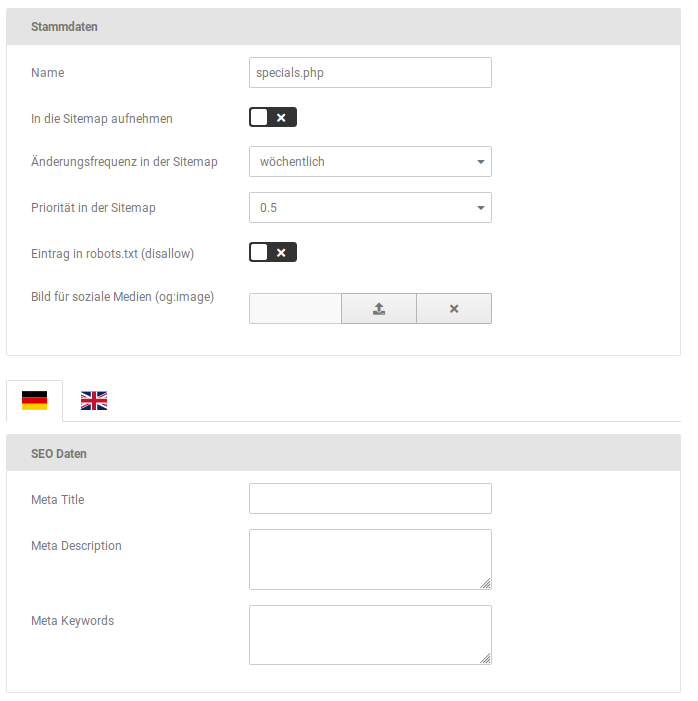
| Field name | Description |
|---|---|
| Name | File name of the static page |
| Include in the sitemap | if the checkmark is set, the page is included in the sitemap |
| Change frequency in the sitemap | Specification of how often the page should be checked for changes by search engines (only a guide value, the actual period is at the discretion of the search engine operator) |
| Priority in the sitemap | Importance of the page compared to the rest of the shop, from 0.0 (relatively unimportant) to 1.0 (very important) |
| Entry in robots.txt (disallow) | if the checkmark is set, the page is included in the robots file |
| Image for social media (og:image) | Image for social media, is embedded with an Open Graph meta tag |
| Meta Title | Title of the page, is also displayed in the browser tab |
| Meta Description | Description of the page, free text |
| Meta Keywords | Keywords under which the page should be found by search engines (comma-separated, without spaces) |
Creating a static page
Via the Create button, further entries for static pages can be added. It is therefore possible to add pages of the shop that have not yet been included or that have been newly added.
The same setting options are available as when editing an existing sitemap (see previous chapter Editing meta information for static pages).
Note
Custom PHP pages cannot be provided with meta information in this way. However, inclusion in the sitemap or the robots file is possible.