Customizing texts
You can change the texts displayed in the storefront, such as the labels of buttons, in the Gambio Admin of your shop under Content > Customize texts.
Attention
Most special characters are stored in the database as HTML umlauts. An overview of the HTML umlauts most frequently used in the German language can be found in the HTML umlauts table.
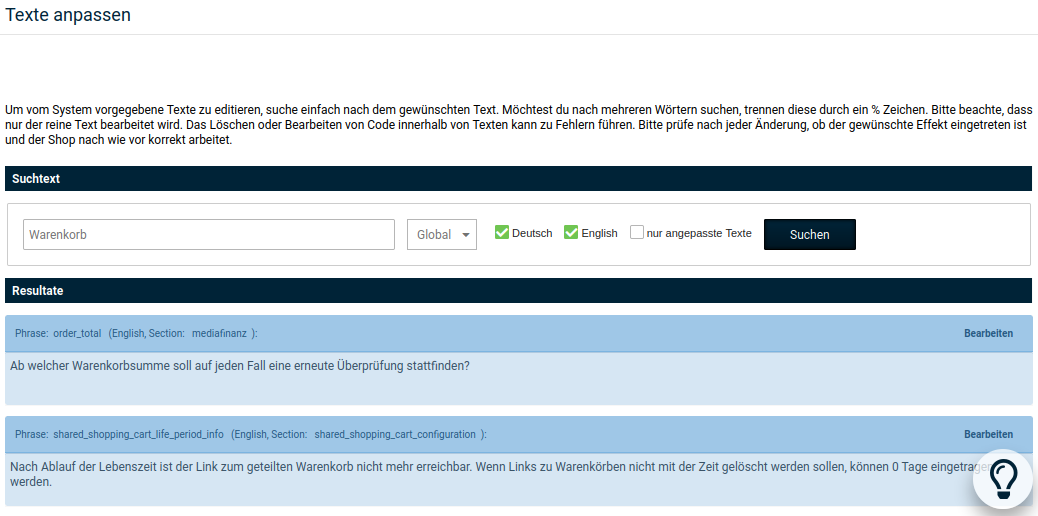
-
Enter the text to be changed in the text field under Search text and click on Search
Under Results, all search results containing the search text are displayed.
-
Click on the text to be changed
The display switches to a text field with two buttons
-
Change the text and click on Save
- Clear the caches for Texts and Page output under Toolbox > Cache.
Note
Some texts are used in various places in the shop. These texts are therefore assigned to several language variables. The name of the language variable for a text is shown in the line above the text. In most cases, the language variables have meaningful names that indicate their intended use. If several texts have the same variable name, the text to be changed for the use case can only be determined by trial and error.
| HTML umlaut | Special character |
|---|---|
| Ä | Ä |
| ä | ä |
| Ö | Ö |
| ö | ö |
| Ü | Ü |
| ü | ü |
| ß | ß |