Redirect Rules
Availability
This module can be called up under Toolbox > Redirect Rules.
Purpose
With this module, pages can be redirected that would return an error code 404 (File not found) on direct access. It is therefore not possible to redirect existing and accessible shop pages with it.
Browser cache
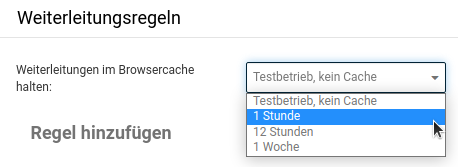
The option Keep redirects in the browser cache determines how long the information about the redirects should be kept in the visitor's browser cache.
Adding a rule
Default setting

By default, expert mode is not active. When setting up redirect rules with expert mode deactivated, the settings
- Match parameters
- 301 redirect
- Discard parameters
are always applied. We describe these below in the section Expert mode.
Expert mode

1: URL to be redirected/invalid URL
Here the old, no longer accessible URL is entered. In addition to the path to the page, a URL can have additional parameters after a separator ("?"), such as details for the desired language, currency, etc. In our example there is the parameter ?language=en, which specifies that this is the English variant of the product page.
2: Match/ignore parameters
Match
When matching, a check is made between the URL to be redirected and the URL called up by the visitor; the parameters appended to the URL can also be taken into account here. The parameters only have to occur in the URL called up by the visitor, but can also be specified in a different order. If, on the other hand, no parameters are specified, redirection only takes place when the URL matches absolutely.
Examples
| URL to be redirected (from point 1) | Call by the visitor | Behavior |
|---|---|---|
| https://www.shop.de?language=de¤cy=EUR | https://www.shop.de?currency=EUR&language=de | Parameters are recognized as present despite the different order; a redirect to the desired target URL takes place |
| https://www.shop.de/alte-seite.html | https://www.shop.de/alte-seite.html | 100% match between the invalid and the called URL; a redirect to the desired target URL takes place |
| https://www.shop.de/alte-seite.html | https://www.shop.de/alte-seite.html?language=en | No complete match between the invalid and the called URL; no redirect takes place |
Ignore
This setting is chosen when the specified old URL should always be redirected, regardless of whether further parameters follow. This also makes it possible to redirect complete old URLs or old categories. A wildcard can be used to specify that everything matching should be redirected.
Examples
| URL to be redirected (from point 1) | Call by the visitor | Behavior |
|---|---|---|
| https://www.shop.de/alte-kategorie/* | https://www.shop.de/alte-kategorie/artikel.html | The URL called up by the customer contains the URL to be redirected, so a redirect to the desired target URL takes place. |
| https://www.shop.de?language=de¤cy=EUR | https://www.shop.de?language=de | Parameters are ignored; only whether the called URL contains https://www.shop.de is checked. That is the case here, so a redirect to the target URL takes place. |
3: Type of redirect
Here the desired type of redirect can be selected. In the default setting, 301 – Moved Permanently is set here. For advanced requirements, the following are also available:
- 301 – Moved Permanently (Permanent redirect)
- 302 – Found (temporary redirect)
- 303 – See Other (expert options)
- 307 – Temporary Redirect (expert options)
- 308 – Permanent Redirect (expert options)
Note
Unfortunately, within the scope of this manual we cannot offer a detailed description or assistance regarding the individual redirect types as such. Since server-side settings are affected here, we recommend contacting your hosting provider in case of doubt.
4: Target URL
Here it is specified where the visitor should be redirected when calling the specified invalid URL. This URL is specified absolutely (completely) and can also lie outside the shop.
5: Handling of the parameters
Extend
If Extend is selected, the parameters specified when calling the page are appended to the target URL. The parameters (here: artikel.html) are thus adopted.
Example
| URL to be redirected (from point 1) | Call by the visitor | Target URL specified in the module | Actual target URL |
|---|---|---|---|
| https://www.shop.de/alte-kategorie/* | https://www.shop.de/alte-kategorie/artikel.html | https://www.ziel-url.de | https://www.ziel-url.de/artikel.html |
Discard
If Discard is selected, the parameters are not adopted to the target URL but discarded.
Example
| URL to be redirected (from point 1) | Call by the visitor | Target URL specified in the module | Actual target URL |
|---|---|---|---|
| https://www.shop.de/alte-kategorie/* | https://shop.de/alte-kategorie/artikel.html | https://www.ziel-url.de | https://www.ziel-url.de |