E-Mail Options
Attention
Changes to the settings under Customers > E-Mails > E-Mail Options can result in no e-mails being able to be sent from the shop system!
Note
In most cases, the e-mail transport method is set correctly by the installation routine. Should e-mail sending fail, first change the option at Sender of the order confirmation mail from Operator e-mail to Customer e-mail. If e-mail sending is still not possible, reset the Sender of the order confirmation mail back to the default setting, change the E-mail transport method to SMTP and enter the SMTP data. Also pay attention here to the correct SMTP port and the selection of the correct SMTP encryption as well as the activation of the setting SMTP AUTH, if the server requires encryption.
E-Mail Templates
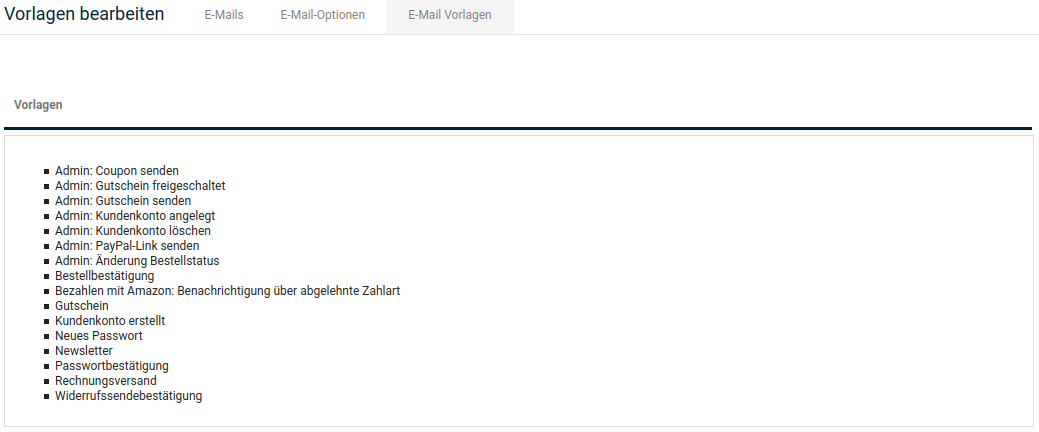
The shop system sends automated e-mails. You can adjust the templates under Customers > E-Mails > E-Mail Templates.
| Template name | Description |
|---|---|
| Change password | Sent to the customer after changing the password via the storefront |
| Customer account created | Sent to the customer after successful customer registration |
| New password | Sent to the customer after confirmation via the forgotten password function |
| Newsletter | Sent to the customer after subscribing to the newsletter |
| Order confirmation | Sent to the customer after completing the order |
| Template name | Description |
|---|---|
| Password confirmation | Sent to the customer to confirm the forgotten password function |
| Invoice dispatch | Sent to the customer when creating an e-mail invoice |
| Gift voucher | Sent when a customer sends part of their credit to another customer |
| Withdrawal dispatch confirmation | Sent when the customer submits the online withdrawal form |
| Payment via Amazon: Notification of rejected payment method | Sent when the selected payment method is rejected by Amazon Payments |
| Admin: Change of order status | Sent to the customer after changing the order status in the administration area, if the checkbox Notify customer was activated |
| Admin: Customer account created | Sent to the customer when a customer account was created via the administration area |
| Admin: Gift voucher released | Sent to the customer when the gift voucher waiting list is used and the gift voucher was released via the administration area |
| Admin: Send coupon | Sent to the customer when a coupon is sent via Gift vouchers > Discount coupons. |
| Admin: Send gift voucher | Sent to the customer when a gift voucher is sent via Gift vouchers > Gift voucher e-mail |
| Admin: Delete customer account | Sent to the administrator when a customer wants to delete their customer account via the function in the storefront |
| Admin: Send PayPal link | Sent to the customer when the administrator generates a PayPal link |
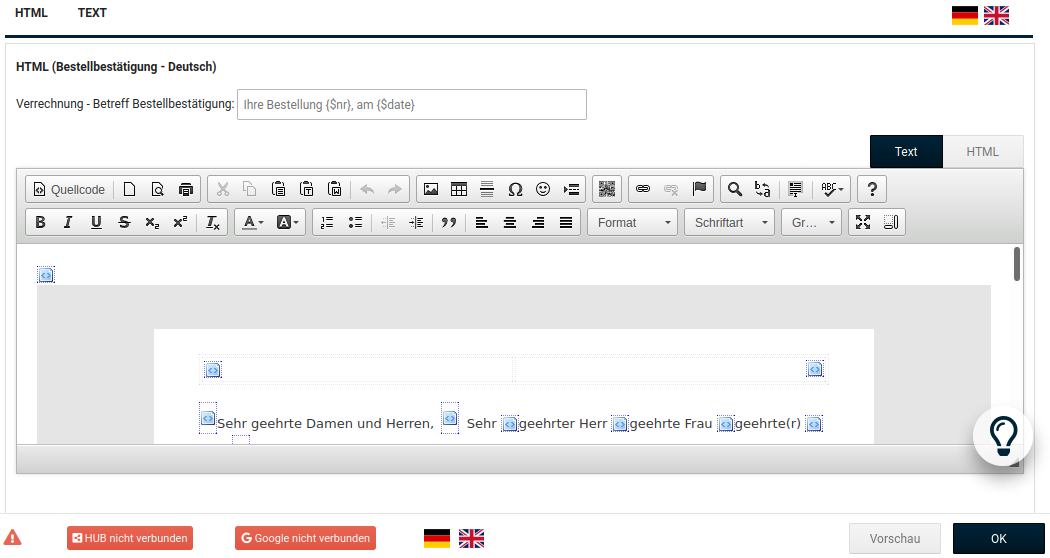
Adjust the desired e-mail template via the CK editor. Click Preview; the preview window must be open so that you can save the changes you have made.